briDJe User Manual
Locked Tracks
Last updated
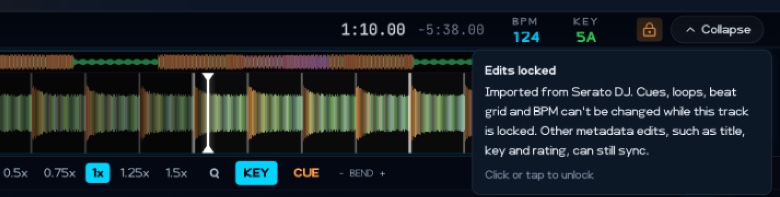
What the lock does
Tracks you import from rekordbox, Serato, Traktor, Engine DJ or VirtualDJ start locked. An amber padlock appears in the header of the expanded deck, next to BPM and KEY. If the deck is shrunk to a strip, press Cmd/Ctrl+B to expand it.
While a track is locked, you can’t change its:
- cue points
- loops
- beat grid
- BPM
Playback, seeking and BEND still work. Changes you made before locking the track are still written back on your next sync, and so are edits to metadata such as title, rating and key.
Unlock a track
- Load the track into the player.
- Expand the deck (
Cmd/Ctrl+B) if it’s shrunk, then click or tap the padlock. - Choose Unlock.
Changes to an unlocked track are written back on your next sync, replacing what the other app has.
To unlock several tracks, select them, right-click and choose Unlock edits, then confirm with Unlock.
Lock a track again
With the deck expanded, click or tap the padlock. No confirmation is needed. To lock several tracks, select them, right-click and choose Lock edits.
Your choice is kept after a reimport and a restart. Tracks added from audio files start unlocked, and you can lock them the same way.